Consumers who like a piece of clothing are often still a few answers short of buying it: Will it look good on me? What size should I pick? Will it work with the rest of my wardrobe?
AI virtual try-on aims to shorten that decision process. But even though these products all follow the same “upload a photo, preview the try-on” pattern, they solve different problems. Some focus on product page conversion, some add size guidance, some support full-outfit styling, and others go further with a personal wardrobe and dynamic styling displays.
This article compares VFitly, GenLook, AI Frame, Antla, and Looksy, starting from their workflows, features, and real user needs, to help you judge which type of tool is worth trying.
Comparison note*: Information verified as of September 13, 2026, compiled from product websites and Shopify app listing details.*
1. The Bottom Line First: Do You Need Product Page Try-On, or a More Complete Styling Tool?
- VFitly — Disclosed feature highlights: virtual try-on, personal wardrobe, saved generated results, runway video; outfit evaluation. Priority needs it addresses: saving candidate garments, comparing looks, dynamic presentation, and styling decisions
- GenLook — Disclosed feature highlights: product page try-on, customizable widget, email capture, interaction analytics. Priority needs it addresses: embedding try-on into the shopping flow while also tracking marketing and data
- AI Frame — Disclosed feature highlights: virtual try-on, size charts, size estimation based on user-provided information. Priority needs it addresses: answering both “does it look good” and “what size do I need”
- Antla — Disclosed feature highlights: Fast/Pro models, embedding try-on images into product image carousels, email capture, Klaviyo integration. Priority needs it addresses: branded presentation and marketing flow integration
- Looksy — Disclosed feature highlights: single-item and full-outfit try-on, add-entire-look-to-cart, short videos, try-on links and QR codes. Priority needs it addresses: multi-item styling, bundle purchases, and cross-channel shopping guidance
2. GenLook: Putting Try-On on the Product Page and Interactions into Marketing
GenLook takes a fairly direct approach: customers upload a photo on the product page, see an AI preview of themselves wearing the garment, and then decide whether to keep shopping.
According to its Shopify app listing, beyond try-on it also offers a customizable widget, email capture, and interaction analytics. That makes it not just a consumer-facing visual tool, but also an entry point for merchants to observe shopping behavior.
From the user experience side, completing a try-on within the product page helps reduce redirects. Users do not have to enter a separate standalone tool and then come back to the store to find the product. The widget’s colors and styles can be adjusted, which also makes it easier for merchants to keep the page visually consistent.
From the merchant’s perspective, GenLook suits stores that want to explore the try-on experience and marketing value at the same time. For example: which products make customers more likely to click try-on? Did anyone leave an email after trying? Which products are worth improving with better images or descriptions?
That said, more engagement does not equal more sales. After launch, results should be evaluated alongside add-to-cart, conversion, and return data, rather than treating try-on counts as the final outcome. The timing of the email capture prompt is also worth testing: asking too early may add friction.
Who it is for: Apparel merchants who want to add try-on to their existing Shopify product pages while also tracking lead capture and operational analytics.
3. AI Frame: Answering “It Looks Good” and “It Fits” Separately
Visual try-on cannot resolve every purchase doubt. A user may already feel a dress suits them yet still not know whether to choose S or M.
The AI Frame website presents three capabilities: virtual try-on, size charts, and “Estimate my size” size estimation. Size charts can be created or imported by merchants and matched to specific products; the estimation feature uses information such as height and weight that users submit voluntarily, and the site explicitly states that it does not infer body measurements from uploaded photos.
Its value lies in putting two different questions into a single shopping flow. Try-on images are used to judge color and overall style, while size charts and estimation provide a different kind of reference.
For users, this is more consolidated than repeatedly switching between product photos, size charts, and customer service chats. For merchants, whether the value materializes still depends on whether size data matches the products and whether users are willing to enter their information.
It should be emphasized: size estimation is not a fit guarantee. The same height and weight can correspond to different body proportions, and fabric stretch, preferred looseness, and brand fits also affect the choice.
Who it is for: Apparel stores whose customers frequently ask about sizing and that want to offer both a visual preview and a size reference.
4. Antla: Looking at Placement, Model Choice, and Downstream Marketing
What is worth noting about Antla is not only that it “generates try-on images,” but also how the results return to the product display.
According to the Antla product page, it supports adding customer try-on images to the product image carousel, showing them alongside the original product photos. Users can continue browsing in a familiar product area rather than completing the experience in a temporary pop-up.
It also describes two models: Antla Fast, focused on speed, and Antla Pro, focused on more detailed visuals. Note that these are the vendor’s own positioning claims and cannot by themselves establish that their results are better than other products. The more reliable approach is to test with your own store’s prints, dark-colored garments, and complex cuts.
On the marketing side, Antla publicly describes email capture, Klaviyo integration, segmentation by product, and the ability to re-market to users who did not complete a try-on.
This combination suits brands that already have some user operations in place: try-on does not only happen before purchase but can connect to follow-up outreach. However, if a store has not started email marketing, the short-term value of these features may be limited.
Antla’s website emphasizes Shopify Plus use cases, but that does not mean it is only for Plus merchants; the actual support scope should be based on the app and plan information.
Who it is for: Merchants that value branded presentation and want to connect try-on results, product browsing, and email marketing.
5. Looksy: From a Single Item to Full Outfits and Dynamic Presentation
If a store wants to sell not just a top but a complete outfit, Looksy’s direction is worth watching.
The Looksy features page describes mixing multiple items, full-look try-on, and a flow for adding an entire outfit to the cart, along with use cases for bundle discounts.
This gets closer to what some consumers actually need: they are not unsure about which individual pieces to buy, but unsure whether those pieces work together. Putting styling and add-to-cart in the same flow reduces the back-and-forth of comparing across multiple product pages.
Looksy also publicly offers short video try-on. The website’s “Try-on, in motion” describes generating a short try-on video from the same photo and viewing the motion effect on the product page. So video generation cannot be described as a capability unique to VFitly in this comparison.
In addition, Looksy supports short links and QR codes that can direct users to try on a specific product. This suits email, social media, or offline materials, extending the try-on entry point beyond the product page.
Who it is for: Apparel brands that want to offer full outfits, bundle purchases, and multi-channel try-on entry points.
6. VFitly: Extending Beyond a Single Try-On into Wardrobe Management and Styling Decisions
The products above mainly revolve around store products and the shopping flow. VFitly shows a different direction: upload photos of a person and garments, generate try-on results, and then keep the garments and looks in a personal workspace.
This suits scenarios that require repeated comparison — for example, choosing a wedding dress, preparing a gown for an evening event, or organizing a few sets of commuting outfits. Users do not necessarily buy right away; they save candidates first and then gradually narrow the range.
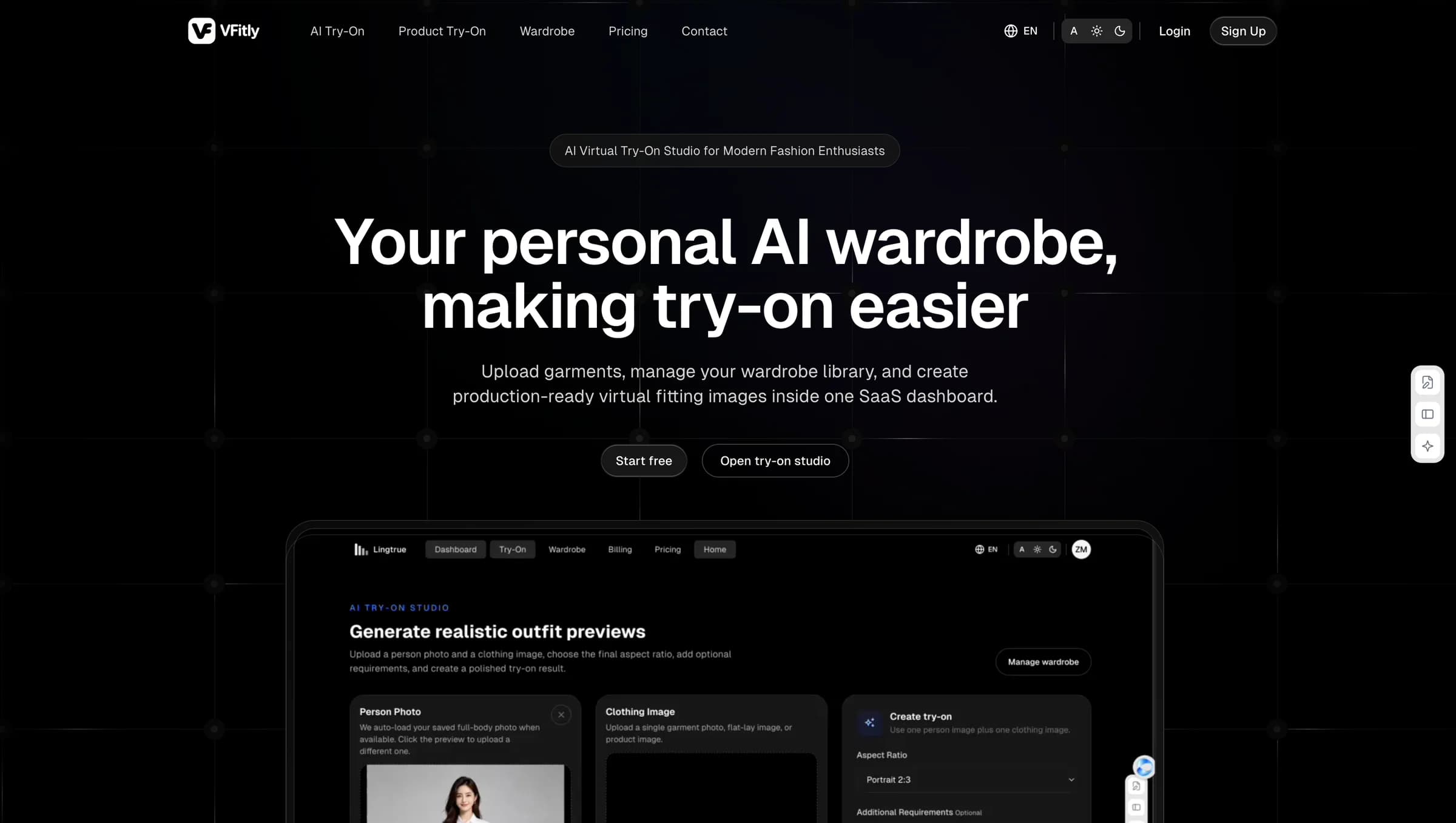
 Figure 1 | VFitly homepage screenshot, showing its positioning as a personal AI wardrobe and try-on workspace
1. Virtual Wardrobe: Making Uploaded Garments Reusable Material
The wardrobe screenshot you provided shows fields for garment upload, name, category, color, and tags, as well as a card-style garment list.
These features may not look as eye-catching as video generation, but they affect long-term use: if you have to find and re-upload images every time you compare garments, the cost of effort keeps accumulating. Keeping candidate garments in one place makes later searching and organizing more orderly.
 Figure 2 | Wardrobe management screen
Another wardrobe screen shows tops, dresses, and footwear at the same time, illustrating the approach of storing different items together.
 Figure 3 | Wardrobe demo screen provided by the user
2. Runway Video: Continuing from Static Results into Dynamic Content
In VFitly’s try-on result screenshot, you can see “Save to Generated Looks,” “Generate Runway Video,” “Download Image,” and a video download entry point.
The distinguishing feature of this flow is that after getting a try-on image, users can continue to save the look, generate a runway video, or download the content — it does not have to end at a static preview.
 Figure 4 | Try-on result and runway video
For wedding dresses, gowns, or long garments, dynamic presentation can add information to how a look is expressed and makes it easier to show candidates to friends. But skirt movement, folds, and turning in AI video may include model guesswork and should not be treated as evidence of real fabric drape or fit.
3. Outfit Evaluation: Moving from “Seeing the Result” to Understanding It
VFitly also supports generating outfit evaluations. This feature attempts to answer a question that static try-on images do not directly address: after seeing the result, how should a user interpret and compare this look?
Its potential value is not giving users a seemingly objective score, but providing understandable, actionable feedback. For example, an evaluation that explains color pairing, occasion suitability, or adjustment directions is more helpful than a vague “it suits you.”
To explore this flow further, you can start with the VFitly try-on workspace; usage quotas and pricing rules should be based on the VFitly pricing page.
7. What Really Affects the Choice Is Not Just the Number of Features
Shopping Flow: Do Users Need to Leave the Product Page?
For Shopify merchants, the next step after try-on matters: is the user still on the original product page? Can they easily find sizing and the add-to-cart button? Standalone try-on tools and native product page widgets are not directly equivalent.
Generation Quality: Is the Garment Still the Same Garment?
Do not just look at whether the portrait is attractive. What is more worth checking is whether the neckline, sleeve length, print, buttons, color, and proportions have been altered. An attractive image that changes product details may actually create inaccurate purchase expectations.
Cost of Use: What Does One Effective Try-On Cost?
When comparing plans, it is advisable to confirm image and video quotas, whether failed generations are charged, overage pricing, concurrency limits, and export conditions at the same time. Comparing only monthly fees makes it easy to overlook the actual cost of use.
Photo Privacy: Can Users Know the Purpose Before Uploading?
What consumers upload are personal photos. Merchants should check the user consent flow, retention periods, deletion methods, third-party processors, and disclosures about model training use.
Business Results: Do Not Mistake Engagement for Conversion
Merchants can observe try-on usage rate, completion rate, add-to-cart rate, and final conversion, but should note that users who were already more likely to buy may be more willing to try on. To judge conversion lift, use a reasonable comparison method rather than directly comparing users and non-users.
VFitly’s distinctiveness in this comparison is not simply “one more video button,” but rather that it puts a personal wardrobe, saved try-on results, and runway video generation into a continuous flow, and — according to the product team — adds outfit evaluation on top.
This is appealing for needs that require repeated comparison, such as wedding dresses, gowns, and occasion wear.
If what you care about most is “saving several options and then deciding which fits best,” you can start with VFitly’s AI try-on entry point and experience the full path from static try-on to dynamic presentation.